Why Playwright Tests Pass Locally but Fail in CI
Why Playwright tests pass locally but fail in CI: common causes, recognizable symptoms, and a practical workflow for debugging artifacts and traces.
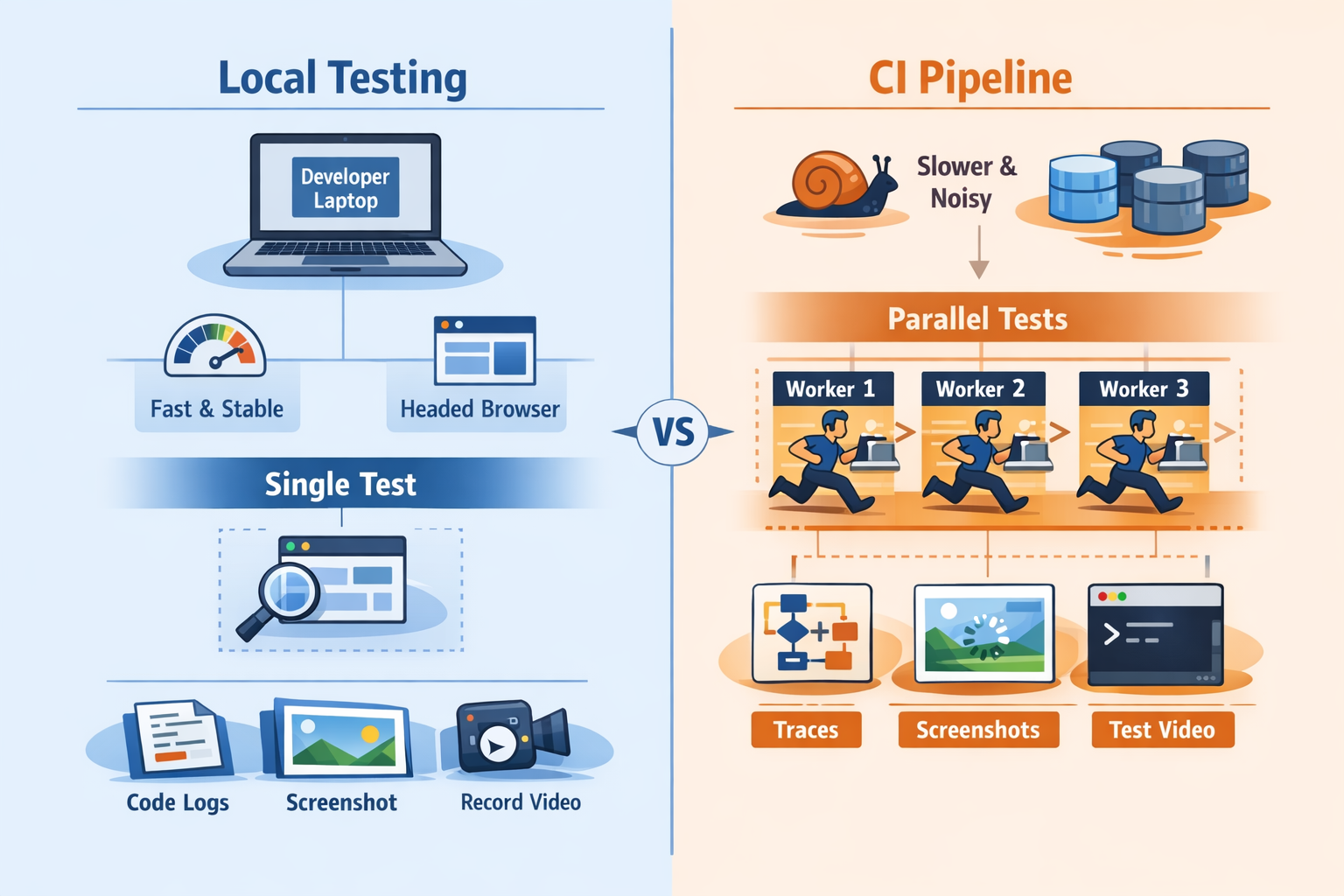
A Playwright test that passes on your laptop but fails in CI is not behaving randomly. It is exposing a dependency your test already had.
Most teams call this “CI flakiness” too early. That label is usually too vague to be useful. What is really happening is a mix of environmental mismatch and hidden assumptions. Your laptop is already warmed up. You may already be logged in. Your machine may be faster in the ways that matter for your app. You are probably running fewer tests at once. CI removes a lot of that comfort.
That is why a test can look healthy during development and still break the moment it runs inside a container, on a hosted runner, or across multiple shards.
The important mindset shift is simple:
CI failures are rarely random. They expose assumptions your tests were already making.
Why This Happens
CI machines behave differently
CI runners are usually more constrained than developer machines. They often have less CPU, less memory, noisier disk I/O, and more background contention. Browser startup can take longer. Rendering can lag. Network timing changes. Animations and layout shifts may occur at different moments.
That matters because timing-sensitive tests usually do not fail where they were written. They fail where the environment stops hiding the race.
A common example is clicking a button immediately after navigation because it always works locally. In CI, the page may still be loading data, the button may still be disabled, or a loading overlay may briefly cover the element.
Parallel execution changes behavior
Playwright runs tests in parallel workers by default, and CI usually pushes harder on parallelism than local development does.
That changes the system around the tests. Shared accounts become a problem. Database fixtures collide. Two tests update the same entity. Temporary files get overwritten. API rate limits appear. Test order starts to matter when it should not.
Locally, you might run one spec file. In CI, the full suite may run across workers and shards. Same code, very different pressure.
Local state hides dependencies
Your laptop often has invisible advantages:
- cached authentication
- existing cookies or local storage
- seeded test data
- environment variables loaded in your shell
- already-installed browser dependencies
- slightly different Node, OS, or browser versions
CI starts clean. That is not a drawback. It is often the first environment that tells the truth.
Headless execution reveals weak synchronization
Another common pattern is a test that passes when you watch it but fails when it runs unattended.
That usually means the test is benefitting from the extra delay introduced by headed mode, debug mode, or step-by-step local investigation. The interaction only works because your local workflow slows the system down enough to avoid the race.
CI runs headless and moves quickly. If your test clicks too early, asserts too early, or depends on a transient DOM state, CI is where that weakness shows up.
Recognizable Symptoms
The same test fails in different places
This is one of the clearest signs of unstable synchronization.
One run times out waiting for a click. Another fails on an assertion. Another says the element detached from the DOM. Another times out during navigation.
Different symptoms, same root issue: the test is racing the application.
Failures appear only under full suite load
If a test passes alone but fails during the full suite, look closely at concurrency and shared state.
Typical patterns:
- it passes in local UI mode
- it passes when run alone
- it passes with `--workers=1`
- it fails in CI under normal parallelism
That is usually not mysterious flakiness. It is interference.
Retries make the pipeline green but confidence worse
Retries are useful, but only if you treat them as a signal.
A test that fails once and passes on retry is not healthy. It is unstable. Green builds created by retries can hide a growing reliability problem until the suite becomes noisy enough that engineers stop trusting it.
Retries help classify failure patterns. They do not fix the underlying cause.
Screenshots are not enough
A screenshot shows you one frame near the point of failure. That can be useful, but it rarely explains why the failure happened.
For CI debugging, you usually need more than a still image. You need sequence and context:
- what action happened before the failure
- what the DOM looked like at that point
- whether the page was still loading
- whether a request failed
- whether a modal, toast, or overlay appeared
That is why traces are usually more valuable than screenshots alone.
How to Debug the Problem
Reproduce under CI-like conditions first
The first mistake is often reproducing the issue in a slower, more forgiving local mode.
Start by making the local run behave more like CI:
CI=1 npx playwright test tests/checkout.spec.ts --workers=4 --retries=0Then reduce variables gradually:
CI=1 npx playwright test tests/checkout.spec.ts --workers=1If the failure disappears with one worker, investigate shared state, ordering assumptions, and data isolation.
If it still fails, look at timing, locators, network dependencies, and environment drift.
Turn on traces for failing runs
Traces are the fastest way to understand most CI failures because they preserve the timeline.
They typically let you inspect:
- each action the test took
- DOM snapshots around each step
- network activity
- console output
- screenshots captured through the run
A practical Playwright config looks like this:
import { defineConfig } from '@playwright/test';

export default defineConfig({
  retries: process.env.CI ? 2 : 0,
  use: {
    trace: 'on-first-retry',
    screenshot: 'only-on-failure',
    video: 'retain-on-failure',
  },
});
That gives you useful evidence without tracing every single passing test.
To inspect a saved trace:
npx playwright show-trace trace.zipCompare the failing action with the previous stable action
When debugging a trace, do not stare only at the final stack trace.
Instead, reconstruct the sequence:
1. What was the last clearly successful action? 2. What changed between that step and the failure? 3. Did the DOM update? 4. Did the page navigate? 5. Did a request arrive late or fail? 6. Did some UI element block the next action?
This is how reliable debugging works. You are building a timeline, not just reading an error string.
Check environment drift explicitly
A surprising number of CI issues come from local and CI environments not actually matching.
Verify the basics:
- Node version
- Playwright version
- browser version
- OS or container image
- timezone and locale
- environment variables
- backend endpoints
- test data setup
Also make sure CI installs the browser dependencies correctly:
npx playwright install --with-depsSmall differences can create failures that look random until you line the environments up properly.
Common Mistakes
Using fixed sleeps
This is still one of the most common causes of weak Playwright tests.
await page.waitForTimeout(2000);
await page.click('[data-test=submit]');
This creates a brittle test for both slow and fast runs. On a slow CI worker, two seconds may not be enough. On a fast run, it wastes time without increasing confidence.
Prefer waiting for a meaningful condition:
await expect(page.getByRole('button', { name: 'Submit' })).toBeEnabled();
await page.getByRole('button', { name: 'Submit' }).click();
That ties the wait to application readiness instead of guessing at timing.
Writing selectors that match by accident
A selector can appear stable locally and still be fundamentally weak.
That often happens when the selector depends on CSS structure, text that appears in multiple places, or elements that exist only briefly during loading.
Prefer resilient locators:
page.getByRole('button', { name: 'Checkout' });
page.getByLabel('Email');
page.getByTestId('submit-order');
Stable locators reduce the chance that timing changes will cause the test to hit the wrong element.
Sharing accounts and mutable data across workers
If multiple tests use the same login, mutate the same cart, or update the same record, parallel workers will eventually collide.
Examples:
- one test deletes data another test needs
- two workers update the same profile
- multiple tests create orders under one account
- shared setup leaves the system in an unexpected state
Isolation must include test data, not just browser context.
Debugging only with video
Video is useful for showing a flow. It is much less useful for explaining a failure.
A video does not tell you the full DOM state at each action. It does not show the structured test timeline. It does not explain which network request failed or which locator matched.
That is why video is helpful context, but trace is usually the stronger debugging artifact.
Better Debugging Workflow
Collect artifacts by default
Do not wait for a severe incident before adding artifact retention to the pipeline.
A strong CI workflow keeps the evidence needed to debug failures:
- traces
- screenshots
- videos
- console logs
- HTML reports
- any relevant backend or network logs
This is where a tool like SentinelQA helps. Not because it magically fixes flakiness, but because it aggregates the artifacts engineers already need when Playwright failures happen in CI.
Classify failures before trying to fix them
Not every red build is the same kind of problem.
A useful first pass is to classify each failure into one of these buckets:
- synchronization bug
- selector bug
- shared state bug
- test data issue
- infrastructure or dependency issue
- genuine product regression
That prevents teams from using “flaky” as a catch-all label for everything.
Reproduce with the smallest meaningful scope
Rerunning the whole pipeline again and again usually wastes time.
Instead, narrow the failure:
CI=1 npx playwright test tests/checkout.spec.ts --project=chromium --workers=1Then inspect the report:
npx playwright show-reportAnd inspect the trace:
npx playwright show-trace trace.zipThis tight loop makes debugging much faster than repeatedly waiting for full-suite reruns.
Practical Tips
Make CI behavior explicit in config
Many teams get better reliability simply by making CI-specific behavior intentional instead of accidental.
import { defineConfig } from '@playwright/test';

export default defineConfig({
  forbidOnly: !!process.env.CI,
  retries: process.env.CI ? 2 : 0,
  workers: process.env.CI ? 4 : undefined,
  reporter: [['html'], ['line']],
  use: {
    trace: 'on-first-retry',
    screenshot: 'only-on-failure',
    video: 'retain-on-failure',
  },
});
The point is not that every suite should use these exact values. The point is that CI settings should be deliberate.
Test the real contract, not the animation
A spinner disappearing does not always mean the page is ready. A navigation event finishing does not always mean the right data is rendered.
Wait for what the user actually depends on:
- a button becomes enabled
- a row appears with expected data
- a confirmation message is visible
- the new URL is loaded and a key element is rendered
Tests become more stable when they assert outcomes instead of transitions.
Compare single-worker and multi-worker behavior
A fast way to identify concurrency issues is to run the same test under different worker settings:
npx playwright test tests/account.spec.ts --workers=1
npx playwright test tests/account.spec.ts --workers=4
If the failure appears only under higher concurrency, you have already learned something important. Stop treating the issue as random and inspect isolation.
Keep artifacts easy to access
The biggest productivity gain in CI debugging is usually not more reruns. It is faster access to evidence.
If engineers have to download separate files from different CI tabs and reconstruct the timeline manually, debugging stays slow. If traces, logs, screenshots, and reports are easy to inspect in one place, root cause analysis becomes much faster.
Conclusion
When Playwright tests pass locally but fail in CI, the problem is usually not that CI is unreliable.
CI is stricter. It removes local conveniences. It starts from a cleaner environment. It adds concurrency. It exposes weak synchronization, hidden state, brittle selectors, and environment drift.
That is useful.
The wrong response is to add sleeps and hope retries keep the pipeline green. The right response is to reproduce under CI-like conditions, capture the right artifacts, inspect traces, and design tests that stay correct when the environment stops helping them.
Once you do that, CI stops feeling random.
It starts behaving like what it really is: the most honest test environment you have.